
Receive email notifications about significant register movements and market activity.
Understand how alerts support ongoing monitoring.
Create an alert for selected companies, indices or peers.
Choose recipients and set price or volume thresholds.
Alerts help you keep track of selected register or market activity by sending notifications directly to nominated email recipients.
You need to monitor significant movements without checking the platform continuously, so you can review activity that may require disclosure, engagement or board reporting.
Creating and managing alerts
Create an alert
Open Markets in the left-hand sidebar and select Alerts.
Select Create an alert.
Enter a clear name for the alert.
Select the companies, indices or peers you want to monitor.
Enter the email addresses that should receive notifications.
Set the required price and volume thresholds.
Save the alert.
Understand the settings
Alert name – a recognisable name that helps recipients understand what is being monitored.
Selection – the individual companies, indices or peers included in the alert.
Recipients – the email addresses that will receive the notification.
Thresholds – the price and volume criteria that determine when an alert is triggered.
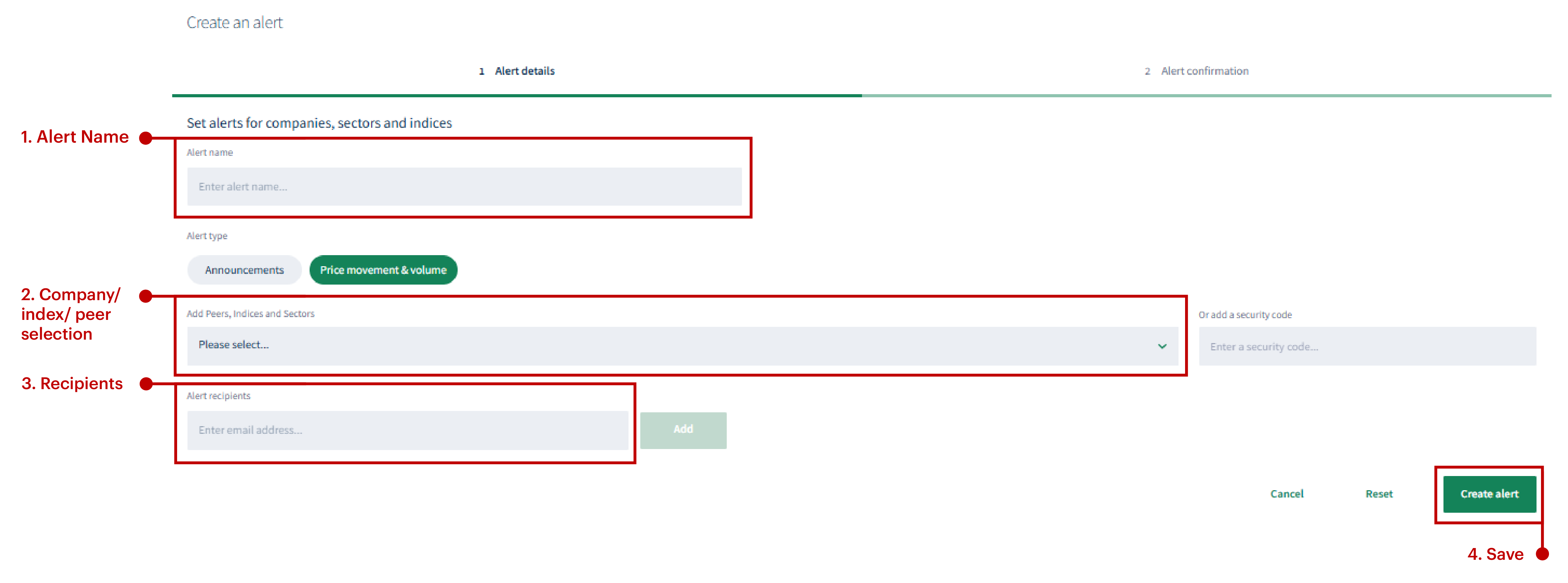
Choose what to monitor, who to notify and the thresholds that should trigger an alert.
Manage alerts
Return to the Alerts area to review your existing alerts. Where the relevant options are available, open an alert to update its monitored entities, recipients or thresholds, or remove an alert that is no longer required.
Good to know
Use descriptive names so alerts are easy to distinguish.
Set thresholds carefully to focus notifications on activity that is material to your organisation.
Review recipient lists regularly and remove addresses that no longer require notifications.
To create downloadable registry information for analysis, governance and operational activity.
About
Privacy Policy
Cookie Notice
MUFG Corporate Markets
A division of MUFG Pension & Market Services

We'll also set a temporary cookie to hide this notice.


