
Get a quick, visual overview of your shareholder register and see how it has changed over time.
What information is available in Snapshot.
How the different Snapshot views can help you.
What you need to do before viewing your data.
Snapshot brings key shareholder register information together in one place. It uses easy-to-read tables to help you understand the composition of your register and identify changes over a selected period.
Top holders – compare issued capital at the beginning and end of a selected period and see the proportion held by your top holders.
Holder type – understand how your register is divided between CREST and certificated holdings.
Holding distribution – see how issued capital and holder numbers are distributed across different holding bands.
Geographical distribution – explore the geographical spread of holders on your register.
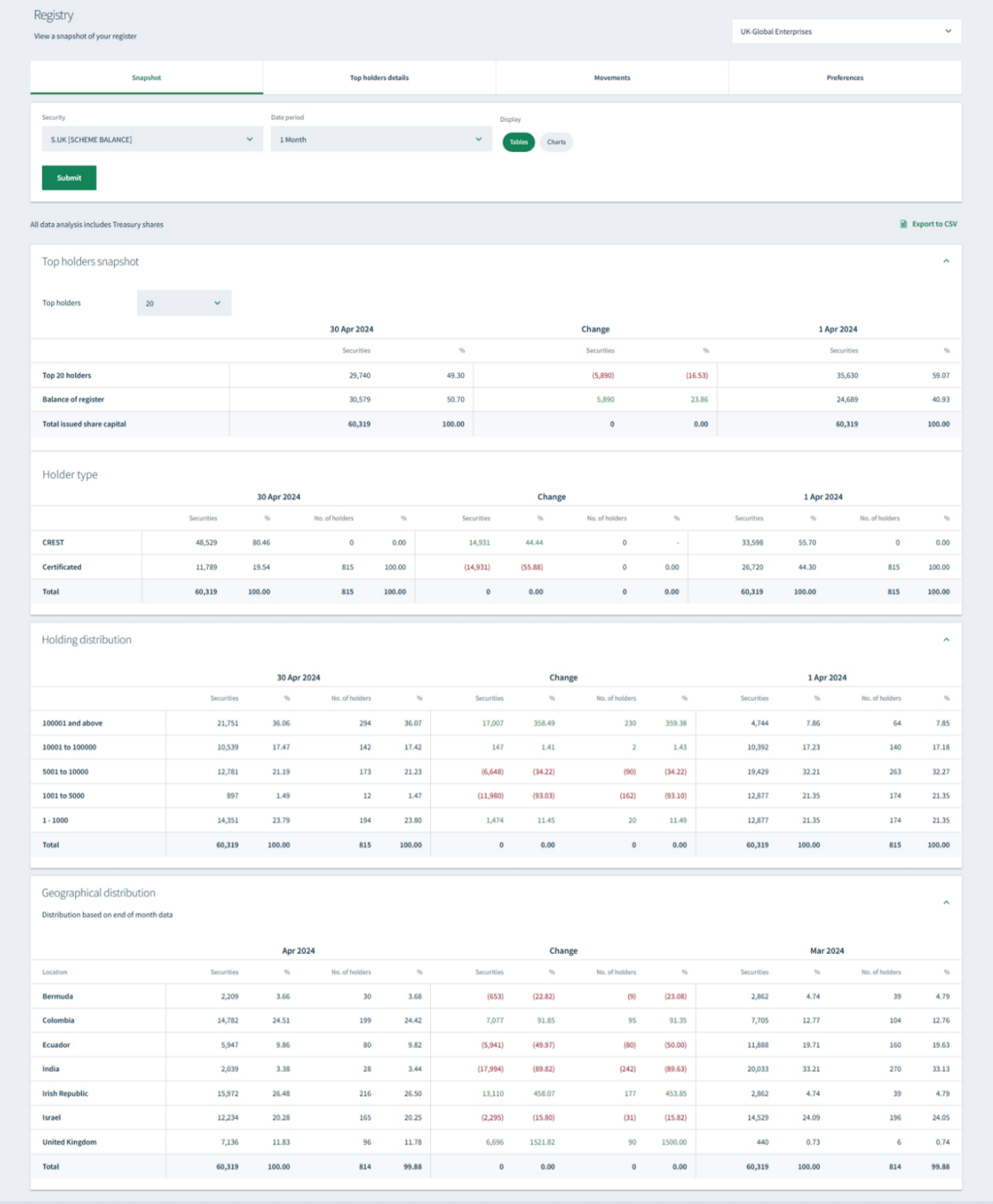
Use Snapshot to explore key information about your shareholder register.
To choose the register information you want to view.
About
Privacy Policy
Cookie Notice
MUFG Corporate Markets
A division of MUFG Pension & Market Services

We'll also set a temporary cookie to hide this notice.


