
The top holders details view shows the individual shareholders included within the top-holder group selected in your filters.
Use this view to identify your largest registered holders and understand their position within the shareholder register.
You need to identify the individual shareholders within your top-holder group, so you can prioritise engagement and monitor important relationships across the register.
View your top holders
Open Registry in the left-hand sidebar
Select the company or stock you want to review.
Choose the relevant share class, where applicable.
Select the date you want to view.
Choose the number of top holders to include.
Apply your filters.
Review the individual holders shown in the Top holders table.
Understanding the results
The table shows the individual holders that make up the selected top-holder group. Depending on the information available, you may be able to review details such as:
Holder name
Number of shares held
Percentage of issued capital
Position or ranking within the selected top holders
Use the results to identify significant shareholders or holders whose position may require closer review.
Good to know
The holders shown will change depending on the company, share class, date and number of top holders selected in your filters.

Choose the company, date and number of top holders you want to review.
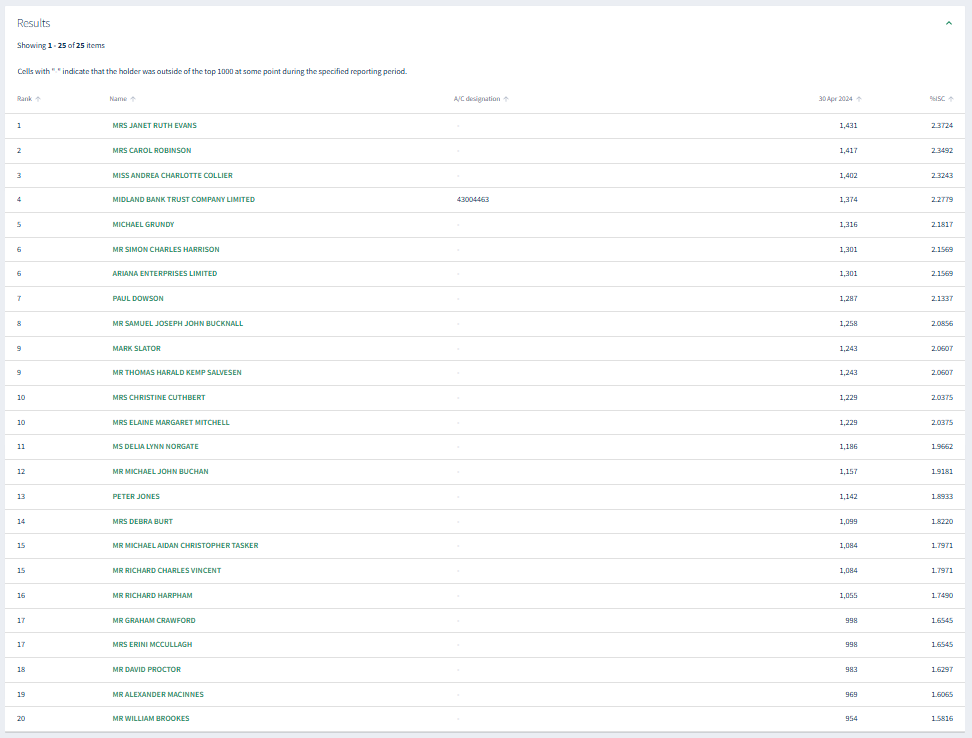
Review the individual shareholders included within your selected top-holder group.
To review acquisitions and disposals over a selected period.
About
Privacy Policy
Cookie Notice
MUFG Corporate Markets
A division of MUFG Pension & Market Services

We'll also set a temporary cookie to hide this notice.


