
See how your register is divided between CREST and certificated holdings.
Review the number of CREST and certificated shares.
Compare holder types over a selected period.
Understand the percentage split across your register.
The Holder type view shows the composition of your register across CREST and certificated holdings.
It compares the number and percentage of shares and holders at the opening and closing dates selected in your Snapshot filters.
You’re preparing for an AGM and need to understand the balance between CREST and certificated holdings, so you can plan shareholder engagement or proxy solicitation activity.
Open Registry in the left-hand sidebar and select Snapshot.
Apply the required Snapshot filters.
Go to Holder type.
Review the position at the opening date.
Check the change during the selected period.
Compare the CREST and certificated position at the closing date.
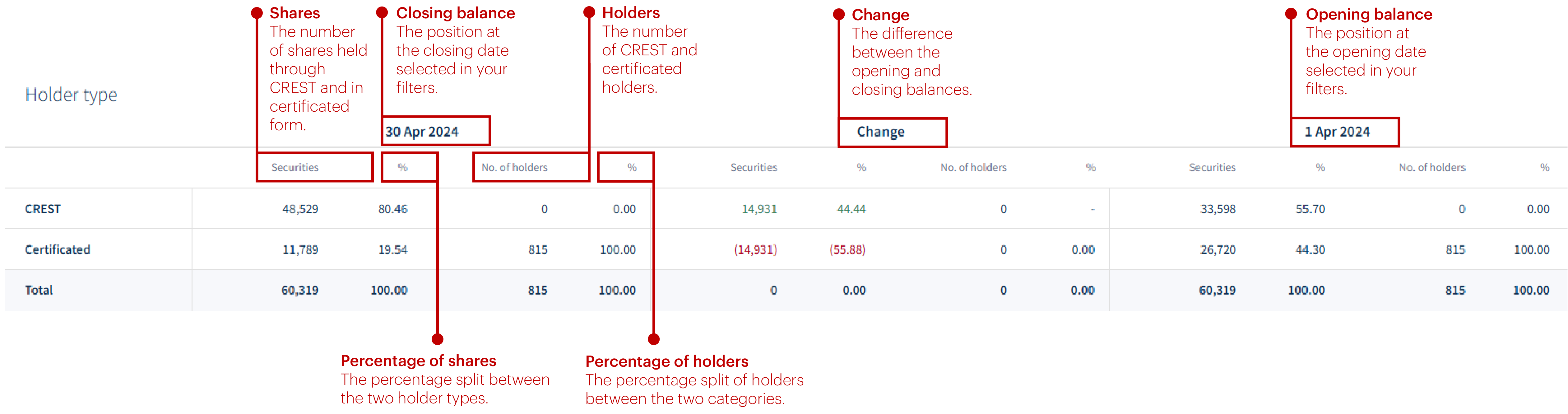
See how your register is divided between CREST and certificated holdings.
To see how issued capital and holder numbers are spread across holding bands.
About
Privacy Policy
Cookie Notice
MUFG Corporate Markets
A division of MUFG Pension & Market Services

We'll also set a temporary cookie to hide this notice.


