
Compare issued capital over a selected period and understand the proportion held by your top holders.
Compare opening and closing issued capital.
Identify changes during the selected period.
Review the proportion of issued capital held by your top holders.
The Top holders view shows the change in issued capital between the opening and closing dates selected in your Snapshot filters date period.
It also compares the position of your top holders with the wider register.
You’re preparing a board report and need to assess changes in the proportion of issued capital held by your top shareholders, so you can identify any material shifts during the reporting period.
Open Registry in the left-hand sidebar and select Snapshot.
Apply the required Snapshot filters.
Go to Top holders snapshot.
Compare the opening and closing balances.
Review the change during the selected period.
Compare the top holders with the wider register.
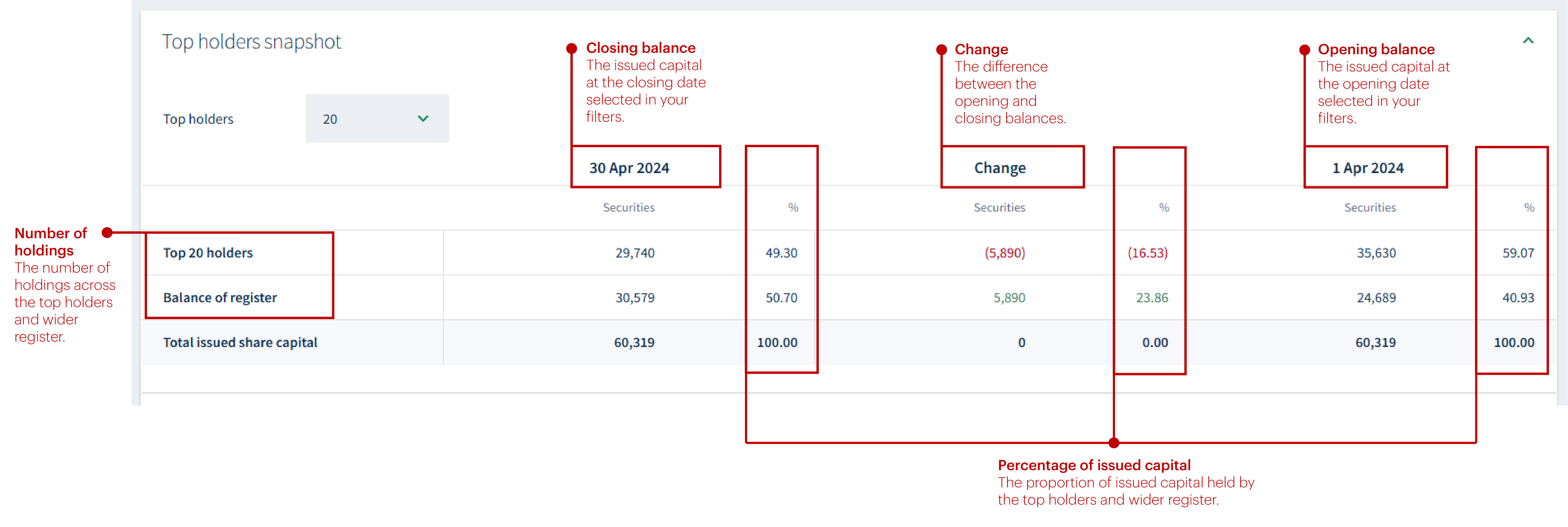
Compare issued capital at the beginning and end of your selected period.
To understand how your register is divided between CREST and certificated holdings.
About
Privacy Policy
Cookie Notice
MUFG Corporate Markets
A division of MUFG Pension & Market Services

We'll also set a temporary cookie to hide this notice.


